Excell Add-Ins for Task Manager
Hello to everyone. Does anyone know how to build in Excel Add-ins for Task Manager? Our OneStream version is 8.2.2.16127? Guidance for this version provides the step-by-step instructions how to set up Add-ins for Word and PowerPoint, but not for Excel Add-ins. Our Task Manager version is PV800 SV100. If to be very specific, we are looking for the opportunity to install Excel Add-Ins to link the preparation status from excel file to particular task in Task Manager. For example, if we have the excel file somewhere outside OneStream (on Sharepoint), and when the work done inside this file, we can push built-in "Complete" button in this file. The completion status from this file automatically forces the change in the preparation status in Task Manager for this task, which is linked to this file through the action type functionality in Task Manager. Does it sound real? Could it be potentially implemented from technical point of view? Thank you in advance for any ideas. Kind regards, Yuliia Muliavka318Views4likes2Comments
List of User Default Home Pages
Hi Folks, Wondering if anyone has built a BR or query to compile a list of Users and their Default Home Page. I know its in the UserAppSettings.xml File within File Explorer under Internal/User, and you can set individuals through the Admin Solution Tools, however I have not found a good way to See what is already set without going to each user individually (that would not be very practical). Appreciate any help! Stephanie59Views0likes3CommentsList of User Default Home Pages
Hi Folks, Wondering if anyone has built a BR or query to compile a list of Users and their Default Home Page. I know its in the UserAppSettings.xml File within File Explorer under Internal/User, and you can set individuals through the Admin Solution Tools, however I have not found a good way to See what is already set without going to each user individually (that would not be very practical). Appreciate any help! Stephanie34Views0likes1Comment
Select Currency Property for Entity Member
While building the hierarchy using codes, In the Entity Dimension hierarchy "EntityH1", I have a base member as "MyBase". Below code is successfully creating a new child member as "T2" under Parent "MyBase". I am able to set the Text1 property. Can please some one help to suggest how to set Currency property to select a particular currency (Let's take "SGD") 'Set the Dimension Type as Entity Dim objMemberPk As New MemberPk(DimType.Entity.Id, DimConstants.Unknown) 'Update Dim Name accordingly Dim objDim As OneStream.Shared.Wcf.Dim = BRApi.Finance.Dim.GetDim(si, "EntityH1") 'Create New Member Dim objMember As New Member(objMemberPk, "T2", "T2 Entities", objDim.DimPk.DimId) 'Create VaryingMemberProperties object Dim objProperties As New VaryingMemberProperties(objMemberPk.DimTypeId, objMemberPk.MemberId, DimConstants.Unknown) 'Create new member info object for new member Dim objMemberInfo As New MemberInfo(objMember, objProperties, Nothing, objDim, DimConstants.Unknown) 'Modify some member properties. Entity dimension, in this example. Dim entityProperties As EntityVMProperties = objMemberInfo.GetEntityProperties() entityProperties.Text1.SetStoredValue(ScenarioType.Unknown.Id, DimConstants.Unknown, "Test Entity Text1") 'Save the member and its properties. Dim isNew As TriStateBool = TriStateBool.TrueValue BRApi.Finance.MemberAdmin.SaveMemberInfo(si, objMemberInfo, True, True, False, isNew) objMember = BRApi.Finance.Members.ReadMemberNoCache(si, objMemberPk.DimTypeId, "T2") 'Create Parent Child Relationship Dim rowParentID As String = BRApi.Finance.Members.GetMemberId(si, objMemberPk.DimTypeId, "MyBase") Dim relToCreatePk As New RelationshipPk(objMemberPk.DimTypeId, rowParentID, objMember.MemberId) Dim relToCreate As New Relationship(relToCreatePk, objMember.DimId, RelationshipMovementType.InsertAsLastSibling, 1) Dim relToCreateInfo As New RelationshipInfo(relToCreate, Nothing) Dim relPostionOpt As New RelationshipPositionOptions(RelationshipMovementType.InsertAsLastSibling, 1) brapi.Finance.MemberAdmin.SaveRelationshipInfo(si, relToCreateInfo, relPostionOpt)Solved55Views0likes1Comment
Next month Data not showing reversal of YTD
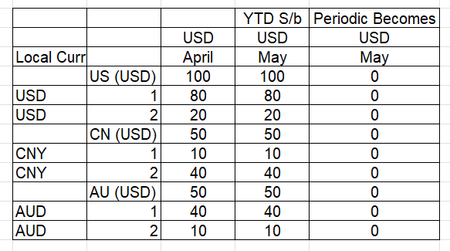
In consolidation system in the month after close example if we close April , May should show reversal of April. Please see below screen shots of how system is should show up and how it is showing. We tried clearing base data through data management. Any ideas would be helpful. Normally However the system is doing45Views0likes1CommentCalculate HC in LIM for Mid-Month Start
Is there an ability to calculate HC expenses that account for when in the month an employee starts and prorate accordingly? As an example, if the employee starts on the 15th then their monthly salary would be Salary / 12 * (15/30). The syntax available in the blocks don't clearly identify if this can be done.Solved235Views0likes5Comments
Rename folder under Application Database in FileShare
I have created a folder under application database in File share, I am trying to rename the folder because of some requirement changes, is it possible to update the folder name? Or even update the file name inside that folder?51Views0likes2Commentspossibility of UD1 parent-member consolidation by time
Dears, I need move one base member under another parent in UD1 dimensions, the problem is that member should be consolidated till specific time period and then should be consolidated under another parent. There is no option like "percent consolidation" with time frame on UD1 dimensions. Could anyone have any solution for described problem? Before: U1#A(parent) U1#A001(base) consolidated till proper month in 2026 U1#A002(base) After: U1#B(parent) U1#A001(base) consolidated after proper month in 2026 U1#B001(base)14Views0likes0CommentsSame Scenario Across Two Cubes vs Separate Scenarios — Pros & Cons?
Hello everyone, I’m looking for feedback on the pros and cons of using a single Actual scenario across two cubes (e.g., Consolidation and FP&A) versus defining separate scenarios for each cube. For example: Option 1 (shared): Consolidation Cube : Actual (Scenario Type = Actual) FP&A Cube : Actual (Scenario Type = Actual) Option 2 (separate): Consolidation Cube : Actual (Scenario Type = Actual) FP&A Cube : Monthly (Scenario Type = Control) From your experience, how do these approaches compare in terms of data governance, maintenance, performance, flexibility for planning/reporting, and potential risks (e.g., unintended impacts between cubes)? Any best practices or lessons learned would be greatly appreciated. Thanks in advance!37Views0likes0Comments